Assign or Change a Project
Use Assign Project to assign one or more sessions to a project or change their current project name.
Project assignments determine how sessions are grouped in Project View.
Assign Sessions to a Project
- Open Session Management.
- Select one or more sessions.
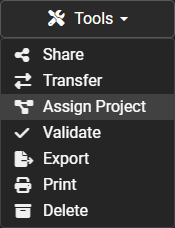
- Open the Tools dropdown.
- Select Assign Project.
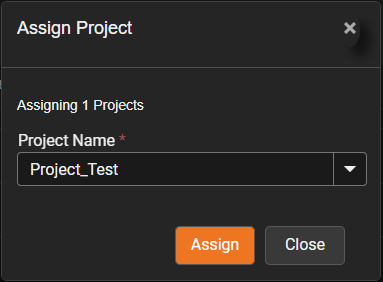
- Select an existing project or enter a project name.
- Review the selected sessions.
- Select Save, Assign, or Submit.
Change a Project Assignment
Use the same process to move sessions from one project to another.
The previous project assignment is replaced by the newly selected project.
Verify the Assignment
- Switch to Project View.
- Locate the assigned project.
- Expand the project.
- Confirm that the selected sessions appear beneath it.
Tip
Assign several related sessions at the same time to keep project organization consistent.
How Project Changes Affect Shared Access
A session can be moved from one project to another.
Access depends on how the session was shared.
Individually Shared Session
If the session itself was shared, changing its project does not remove the individual session share.
Shared Project
If access was granted by sharing the project, moving the session out of that project may remove or change the project-based access to that session.
Important
Review shared access before moving sessions between projects.