
For a detailed comparison of all software, see the POSM Products Features Matrix.
OFFICE SOFTWARE


Fully Managed Cloud Platform for Sewer Inspection Data
POSM Central is a fully managed cloud platform for storing, reviewing, managing, and sharing sewer inspection data. It brings inspection databases, video, images, reports, GIS information, user access, and collaboration tools together in one browser-based environment.
Central is hosted and maintained by POSM, so your organization can use cloud-based inspection management without installing or maintaining its own POSM server infrastructure.
Preview the POSM Central Interface
POSM Central uses the same core browser interface as POSM Web for managing inspections, editing observations, reviewing media, and viewing reports. Central adds organization-level access, sharing, ownership transfer, and cloud-management features for teams working across organizations.
A dedicated Central preview environment is coming soon. In the meantime, you can explore the core browser interface through POSM Web.
Launch Web Preview →After launching, select Continue as Guest.

Collaboration Across Organizations
POSM Central is designed for inspection workflows where contractors, municipalities, engineering firms, and other organizations need controlled access to the same inspection information.
- Share inspections with other Central users and organizations
- Provide view, download, or edit access as appropriate
- Send downloadable inspection packages without requiring a Central account
- Transfer inspection ownership between organizations when responsibility changes
- Keep organization-owned data separated by default
Sharing provides access without changing ownership. When ownership itself needs to move from one organization to another, Central provides a separate transfer workflow.

Centralized Session and Project Management
Session Management gives users one place to organize, locate, review, and work with inspection data.
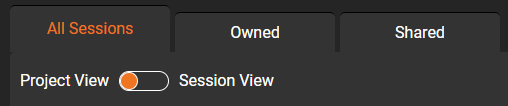
- Switch between project and session views
- Work with owned and shared inspections
- Search and customize session information
- Assign inspections to projects
- Validate, export, print, and manage inspection sessions
Browser-based access makes the same inspection information available to authorized users in the office, in the field, or working remotely.

Review and Edit Inspection Data
Authorized users can review inspection information directly through the Central browser interface and make corrections when their role and access level permit.
- Review inspection headers and observations
- Edit inspection information when permitted
- View inspection video and supporting images
- Work with additional inspection files and media
- Perform office review and quality-control workflows
Because inspection data and media stay together, reviewers can work from the inspection record instead of moving between separate applications and storage locations.

Organization-Based Access and User Management
POSM Central uses organization-level access controls to help administrators manage who can use the platform and what they are allowed to do.
- Invite and manage Central users
- Assign user roles and permissions
- Activate or deactivate user access
- Manage organization settings
- Control access to shared inspection data
A user's organization role continues to govern what that person can do, even when another organization shares an inspection with them.

Fully Managed by POSM
POSM Central removes the burden of maintaining local server infrastructure while giving organizations a scalable environment for inspection data.
- POSM-hosted cloud platform
- No local POSM server to install or maintain
- Platform updates managed by POSM
- Cloud-based storage for inspection data and media
- Browser access for authorized users
Your team can focus on inspection workflows and data management while POSM manages the Central platform.
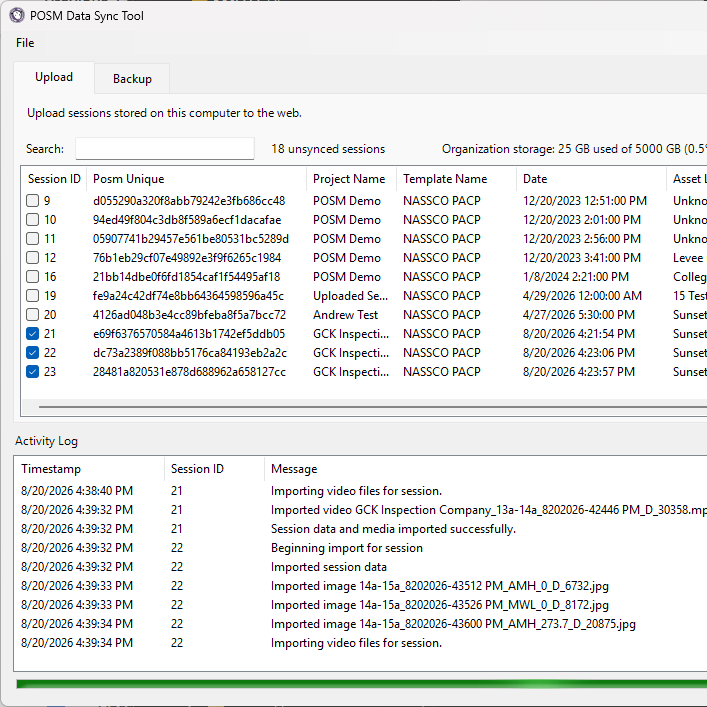
POSM Web Sync Powered
POSM Central uses POSM Web Sync to transfer inspection data and media from POSM systems into the cloud.
- Upload inspections, video, images, and metadata
- Monitor inspection synchronization status
- Support large inspection datasets and unattended transfers
- Use a consistent sync workflow across POSM Web and POSM Central
- Back up and move inspection information into Central through supported sync workflows
The familiar POSM sync process helps organizations move from desktop or server-based environments into Central without changing how crews collect inspection data in the field.
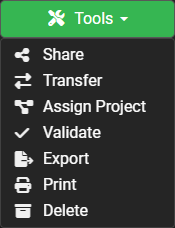
Reports, Export, and Inspection Tools
Central keeps inspection information connected so users can move from the inspection record to the supporting reports, video, images, and GIS-linked assets they need.
- View inspection reports in the browser
- Access video, images, and additional files
- Print and export inspection information
- Open supported inspection reports from GIS workflows
- Move between Central and GIS-linked inspection assets
This helps engineering, operations, and management teams work from the same inspection information without maintaining separate copies of the data.
Who POSM Central Is For
POSM Central is designed for organizations that need browser-based access, controlled collaboration, and a clear way to manage both owned and shared inspection data.
- Municipalities working with multiple inspection contractors
- Contractors delivering inspections to different clients
- Engineering firms reviewing inspection data and reports
- Organizations that need controlled sharing between teams
- Customers that want cloud access without managing their own POSM server
Users can quickly move between All Sessions, Owned, and Shared inspections and switch between Project View and Session View depending on how they need to work.
Key Benefits at a Glance
- Fully managed cloud inspection platform
- Centralized session and project management
- Organization-level user access and permissions
- Cross-organization sharing and ownership transfer
- Browser-based review, editing, reporting, and media access
- GIS-connected inspection workflows
- POSM Web Sync integration
- No POSM server infrastructure to maintain

POSM Central Help and Documentation
Already using POSM Central? Visit the POSM Central Help site for step-by-step instructions, product guidance, and troubleshooting.
- Getting started and navigation
- Session and inspection management
- User access and organization administration
- Sharing and ownership transfer
- Reports and GIS integration
- Data synchronization and troubleshooting
See POSM Central in Action
See how POSM Central can support inspection management, cloud storage, user access, collaboration, reporting, GIS, and data sharing for your organization. Our team can walk through your current workflow and help determine the best setup for your needs.
